Monthly return patterns for any stock. See which months historically deliver gains and which ones consistently drag performance down.
Every investor has a gut feeling about certain months. January feels like a fresh start. September always seems to sell off. But is any of that backed by real numbers for the specific stocks you own?
Seasonality is one of the most talked-about concepts in investing, yet very few people actually measure it for their own holdings. You hear phrases like "sell in May" or "the January effect" repeated endlessly, but rarely with data attached to a specific ticker.
Getting real seasonality data for individual stocks used to mean downloading years of price history and building your own spreadsheets. Most investors never get around to it.
We built something that does it instantly.
The Seasonality Tool shows monthly return patterns for any stock or ETF. Enter any ticker and you instantly see the median and average return for each month of the year, going back through the full available history.
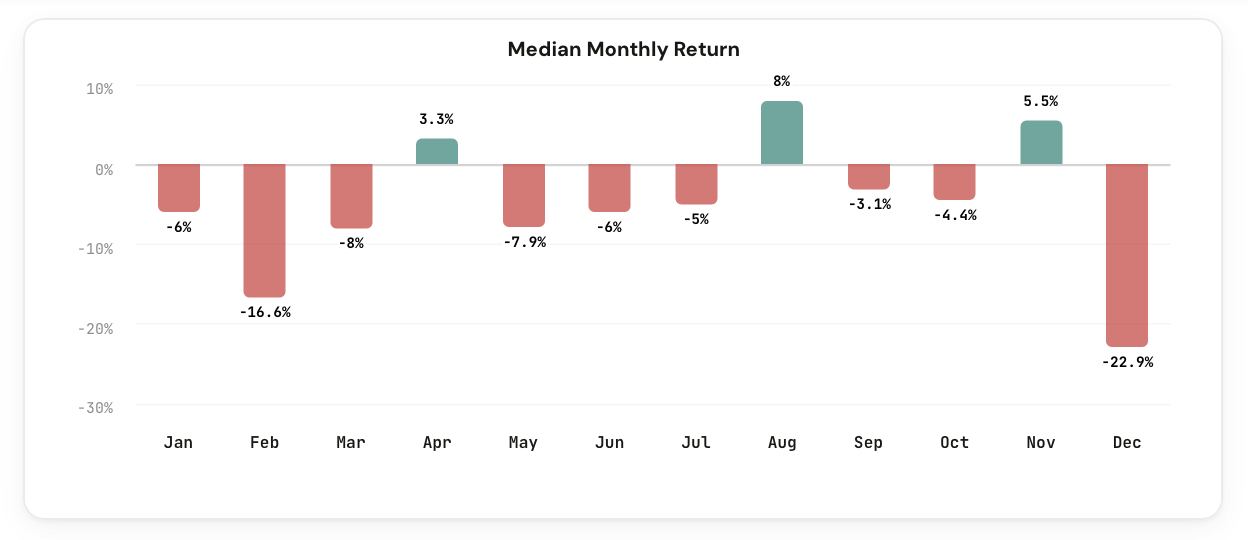
Type in AAPL and see which months have historically been strongest for Apple. Switch to TSLA and compare whether Tesla follows the same seasonal rhythm or marches to its own beat. Try SPY to see how the broad market behaves month by month.
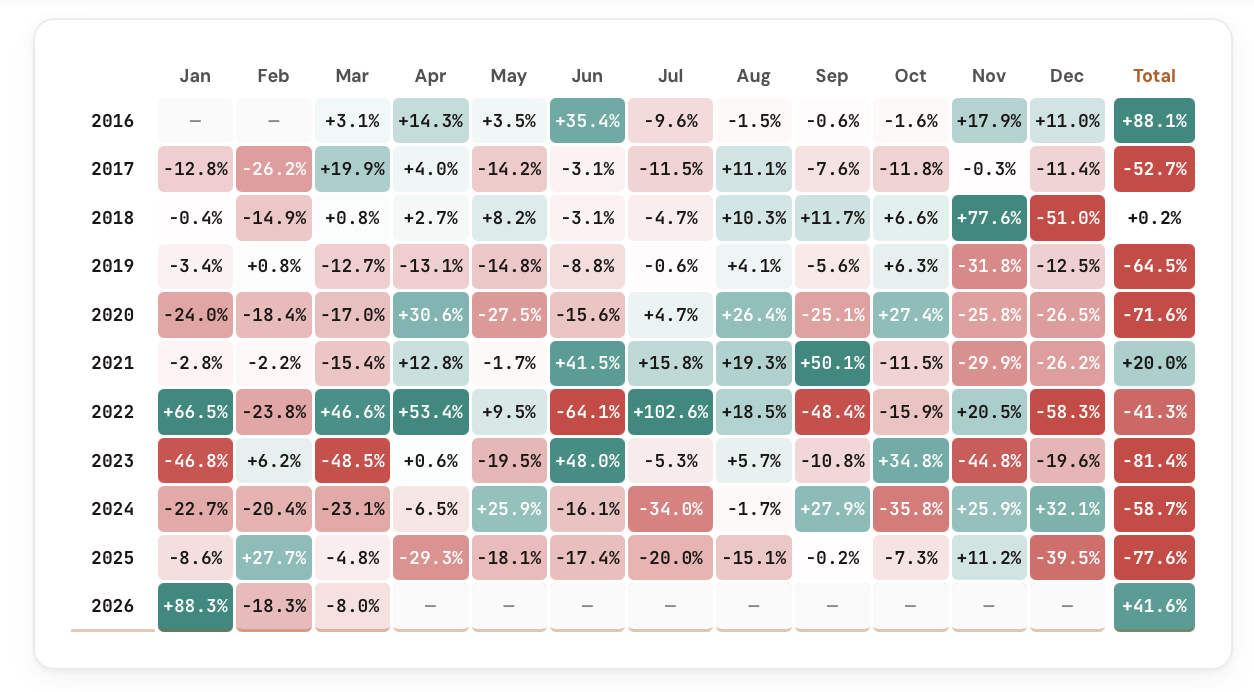
Complete monthly return breakdowns for any stock or ETF you want to analyze.
See the median and average return for each month, January through December. Toggle between the two to understand typical vs. mean-skewed performance.
A clean bar chart showing every month at a glance. Green for positive months, red for negative. Spot seasonal patterns instantly.
Switch to Detail view to see every individual year's return for each month. See the range, the outliers, and how consistent the pattern really is.
Built-in tickers for quick access, plus a custom input for any stock or ETF symbol. Type in your favorite holding and get its full seasonal profile in seconds.
Summary gives you the quick read: median/average per month. Detail gives you the full dataset: every year, every month, every return.
Flip between tickers to compare seasonal patterns. See whether two stocks in the same sector share the same strong and weak months, or if they diverge.
The tool calculates monthly returns for each ticker across its full available history. For each calendar month, it computes both the median return (the middle outcome, resistant to outliers) and the average return (which captures the full impact of extreme months).
This is the tool you want open when planning entries, exits, or hold periods around calendar effects. If a stock you own historically loses ground in September, that context is worth having before you add to your position in late August.
Five ways members are applying the Seasonality Tool to their investment process.
Identify the historically weakest months for a stock you want to buy. Use seasonal dips as better entry points instead of chasing rallies.
Know which months tend to mark seasonal peaks. Consider taking partial profits before historically weak stretches begin.
If your investment thesis requires holding for several months, check whether those months historically work for or against the stock.
Compare seasonality across stocks in the same industry. Find out if the seasonal pattern is sector-wide or unique to a specific company.
Test common beliefs like "sell in May" or "the Santa Claus rally" against actual monthly return data for the stocks you hold.
The Seasonality Tool is available in your dashboard under Premium Tools. If you're a CI Volatility member, you already have access.
Open the Seasonality Tool
Comments
Loading comments…