New Tool Launch
February 24, 2026

Your Stock Just Spiked 50%. What Happens Next?

We just launched the Spike Analyzer, a new tool that shows you exactly how any spike percentage resolved historically across every ticker.

UVXY just spiked 50% from its all-time low. You're staring at the chart thinking: has this happened before? And if it has, what came next? Did it keep running? Did it collapse back down? How long did it take?

These are the questions that matter most during a spike, and they're the hardest to answer in real time. Most traders end up scrolling through old charts or relying on memory. Neither is reliable when money is on the line.

Until now, the only way to get a real answer was to manually calculate spike percentages from all-time lows across years of price data, for every ticker, one at a time.

We built something better.

Introducing the Spike Analyzer

The Spike Analyzer is designed for one purpose: enter any spike percentage and instantly see how it resolved across every ticker in the CI Volatility suite. Side-by-side comparison, real historical data, no guesswork.

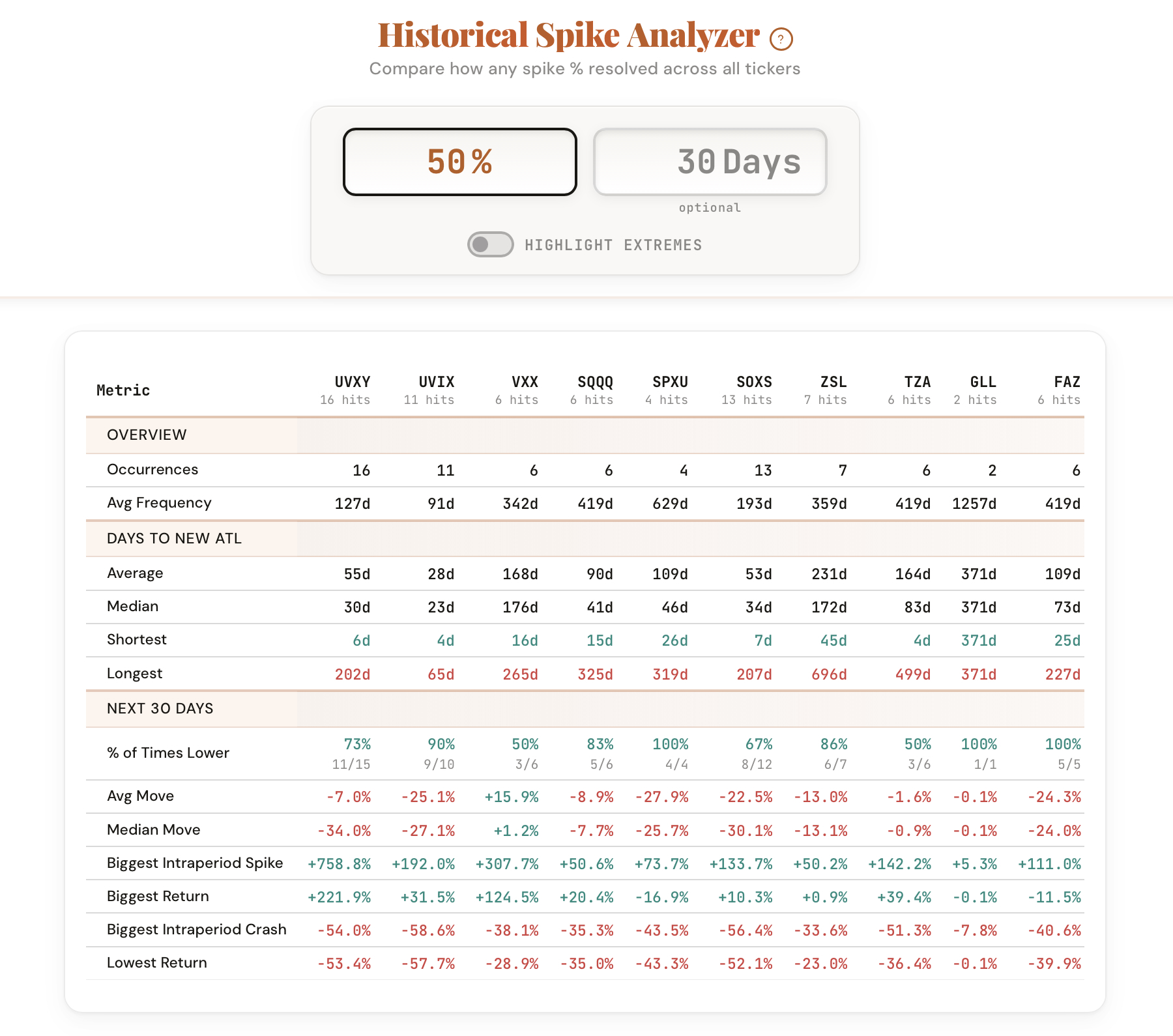
Type 50% and the tool pulls every historical instance where each ticker reached a 50% spike from its all-time low. You see exactly what happened next: how far it ran, how fast it faded, and where the price ended up days and weeks later.

No more guessing. No more "it feels toppy." Just the data.

What the Tool Shows You

A complete cross-ticker comparison of how any spike percentage resolved historically.

Comparison

All Tickers at Once

Enter a spike % and see how it played out across UVXY, UVIX, VXX, SQQQ, SPXU, SOXS, ZSL, and BOIL in one unified view.

Resolution

What Happened Next

For each ticker, see where the spike went from the point you entered. Did it extend to 80%? Fade back to 20%? The tool tracks the full trajectory.

Timing

Days to Resolve

How long did each spike take to fade or extend? See the number of trading days from your entered spike level to the eventual peak or trough.

Historical

Every Occurrence

A complete log of every time each ticker hit your spike threshold, with dates, prices, peak levels, and resolution timelines.

Optional

Time Window Filter

Optionally set a number of days to analyze. See what happened within 5 days, 10 days, or 30 days of hitting the spike level.

Visual

Highlight Extremes

Toggle extreme highlighting to instantly spot the best and worst outcomes across the dataset. Pattern recognition at a glance.

How It Works

The Spike Analyzer calculates every ticker's distance from its all-time low on every trading day in history. When you enter a spike percentage, the tool finds every instance where each ticker reached that level and shows you exactly what happened from that point forward.

The comparison view gives you:

This is the tool you want open when volatility spikes and everyone is asking the same question: has this happened before, and what came next?

How Traders Are Using It

Five ways members are already applying the Spike Analyzer to their process.

1

Spike context

When a ticker spikes, instantly check whether this level historically marked a top or a continuation point.

2

Cross-ticker comparison

See which tickers tend to extend further from a given spike level and which tend to fade fastest.

3

Entry and exit timing

Use the days-to-resolve data to set realistic time horizons for fade trades or continuation plays.

4

Risk assessment

Before shorting a spike, check the worst-case historical extension from that level. Know your tail risk.

5

Volatility research

Study how spike behavior differs across leveraged ETFs, inverse products, and commodity-linked tickers.

The Tool Is Live Now

The Spike Analyzer is available in your dashboard under Premium Tools. If you're a CI Volatility member, you already have access.

Open the Spike Analyzer

Comments

Loading comments…