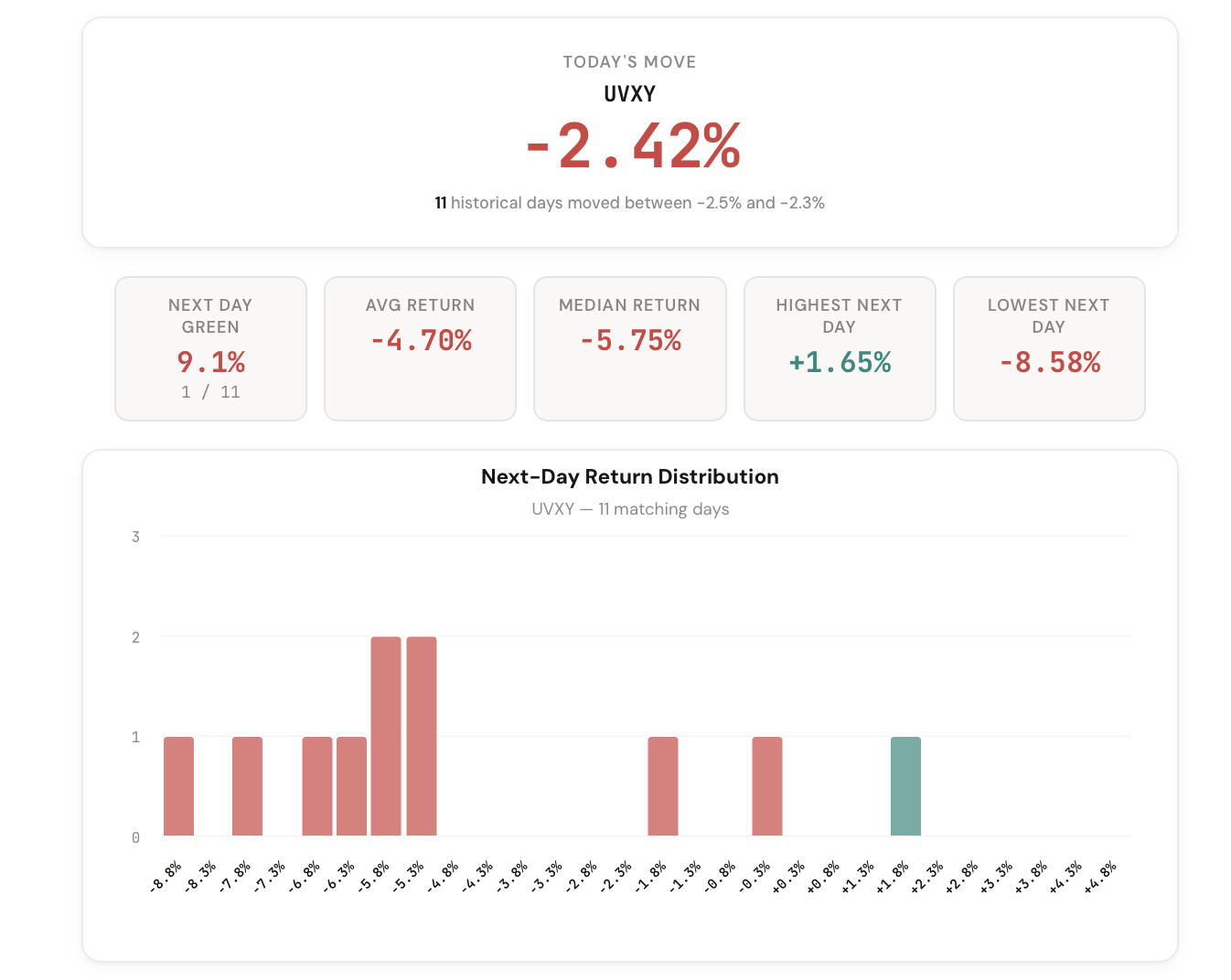
We just launched the 1-Day Outlook tool, a new addition to the CI Volatility suite that answers this question with real data.
The S&P 500 just dropped 1.2% today. You're sitting at your desk wondering: based on history, what tends to happen next? Does it keep falling? Does it bounce? How often does a move like this reverse the following day?
Most traders rely on gut instinct or social media sentiment to answer that question. Maybe you've seen someone tweet "oversold, bouncing tomorrow" or "this is just getting started." But none of that is backed by data.
Until now, getting a real answer meant manually pulling years of historical data, filtering for similar moves, and calculating the statistics yourself. Hours of work for a single lookup.
We built something better.
The 1-Day Outlook tool is the newest addition to the CI Volatility suite, and it does one thing exceptionally well: it tells you what historically happened the next trading day after a move like today's.
Pick any ticker. The tool automatically detects today's move, finds every historical day with a similar percentage change, and shows you exactly what happened the following session. Distribution charts, directional probabilities, average returns, and a complete log of every matching day.
No more guessing. No more "it feels oversold." Just the numbers.
A complete statistical picture of what happened next after similar moves.
After a move of this size, what percentage of the time did the stock go up the next day vs. down? Know the historical directional bias instantly.
What was the average next-day return after similar moves? See whether the historical tendency was to continue, reverse, or stay flat.
A full distribution chart showing where next-day returns clustered. See the range, the skew, and where the majority of outcomes landed.
Match by range (any move between -1% and 0%) or enter a custom percentage with an adjustable tolerance window for precise lookups.
Isolate results by volatility environment. Filter by VIX below 20, above 20, or above 30 to see how next-day behavior changes in different regimes.
SPX, VIX, UVXY, UVIX, VXX, SQQQ, SPXU, SOXS, ZSL, BOIL built in. Or type any custom ticker for instant analysis.
The tool takes today's percentage move for any ticker and searches the entire historical record for days with a similar move. You control the matching criteria: use the range mode for broad buckets (like "any day between -1% and 0%") or custom mode with a tolerance window for precise lookups.
Once matched, the tool calculates next-day statistics across every historical occurrence:
The VIX regime filter lets you slice the data further. A -2% SPX day when VIX is at 15 tells a very different story than the same move when VIX is at 35.
Five ways members are already applying the 1-Day Outlook to their process.
Before the close, check whether today's move historically led to continuation or reversal the next day.
Decide whether to hold a position overnight based on the historical probability of a follow-through or a fade.
Use the VIX filter to understand how the same move plays out differently in calm vs. stressed markets.
Compare next-day tendencies across SPX, VIX, UVXY, and leveraged ETFs after the same type of move.
Cross-reference your mean-reversion or momentum setups against the historical base rate for similar days.
The 1-Day Outlook is available in your dashboard under Premium Tools. If you're a CI Volatility member, you already have access.
Open the 1-Day Outlook
Comments
Loading comments…